

Custom business software helps growing companies manage customers, operations, reports, workflows, and business data from one organized system. But many businesses get confused between CRM, ERP, and custom dashboards. Each option solves a different problem, and choosing the right one depends on your business process, team size, and growth goals.
As businesses grow, managing customers, teams, sales, operations, inventory, reports, and internal workflows becomes more complex. Spreadsheets, WhatsApp updates, manual follow-ups, and scattered tools may work in the beginning, but they often create delays, errors, and poor visibility.
Custom Business Software: CRM, ERP, or Dashboard?
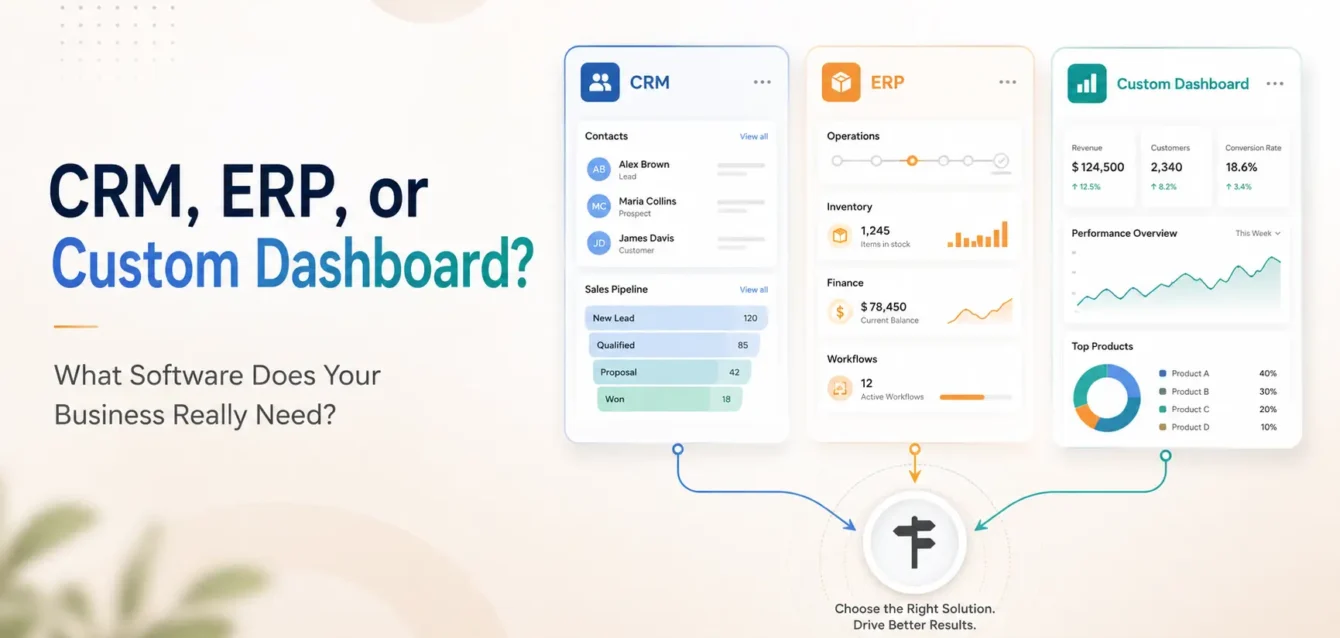
A CRM, or Customer Relationship Management system, helps businesses manage leads, customers, sales follow-ups, communication history, and customer relationships.
CRM software is mainly focused on sales, marketing, and customer management.
A CRM is useful when your business needs to:
- Manage leads from website, ads, calls, or referrals
- Track customer communication and follow-ups
- Assign leads to sales team members
- Monitor sales pipeline and conversion status
- Improve customer support and retention
- Store customer details in one organized place
Common CRM Features
- Lead management
- Customer database
- Sales pipeline tracking
- Follow-up reminders
- Call and meeting notes
- Quotation and proposal tracking
- Customer support history
- Sales reports and team performance
Best Example
A service-based business receiving daily inquiries from its website, social media, and phone calls can use a CRM to track every lead and ensure no customer is missed.
What Is an ERP?
An ERP, or Enterprise Resource Planning system, is a larger business management software that connects multiple departments and operations into one system.
ERP software is mainly focused on internal business operations.
An ERP is useful when your business needs to manage:
- Inventory
- Purchase orders
- Sales orders
- Billing and invoices
- Finance and accounts
- HR and payroll
- Warehouse operations
- Vendor management
- Production or service workflow
Common ERP Features
- Inventory management
- Order management
- Billing and invoicing
- Purchase management
- Vendor management
- Employee management
- Role-based access
- Accounting reports
- Operational reports
Best Example
A manufacturing, trading, distribution, or multi-branch business can use an ERP to manage inventory, purchases, billing, and operations from a single system.
What Is a Custom Dashboard?
A custom dashboard is a personalized software interface that shows important business data, reports, analytics, and actions in one place.
A dashboard may be part of a CRM, ERP, SaaS platform, admin panel, or internal tool.
A custom dashboard is useful when your business needs to:
- View real-time business reports
- Track sales, orders, leads, revenue, or users
- Monitor team performance
- Manage admin operations
- See data from multiple sources in one place
- Make faster decisions using clear insights
Common Custom Dashboard Features
- Revenue reports
- User analytics
- Order tracking
- Lead reports
- Admin controls
- Charts and graphs
- Role-based access
- Export reports
- Notification panels
- Performance metrics
Best Example
An online business can use a custom dashboard to track total orders, revenue, customers, pending tasks, support tickets, and marketing performance from one screen.
CRM vs ERP vs Custom Dashboard: Main Difference
| Software Type | Main Purpose | Best For |
|---|---|---|
| CRM | Managing customers, leads, and sales | Sales teams, service businesses, agencies |
| ERP | Managing business operations | Manufacturing, trading, inventory, finance, HR |
| Custom Dashboard | Viewing reports and controlling workflows | Admin teams, founders, managers, operations teams |
In simple words:
- A CRM helps you manage customers.
- An ERP helps you manage business operations.
- A custom dashboard helps you monitor and control important business data.
When Should You Choose a CRM?
You should choose a CRM if your main problem is related to leads, customers, sales, or follow-ups.
For example, your business may need a CRM if:
- Your team is losing leads
- You cannot track customer follow-ups properly
- Sales data is scattered across Excel sheets
- You do not know which sales executive is handling which lead
- You want to improve customer communication
- You want better sales reports
A CRM is usually the best starting point for service-based businesses, real estate companies, consultants, agencies, education businesses, clinics, and B2B companies.
When Should You Choose an ERP?
You should choose an ERP if your business has multiple departments and you want to manage operations from one place.
For example, your business may need an ERP if:
- You manage stock or inventory
- You create invoices manually
- You handle purchase and vendor records
- You need finance, HR, and operations connected
- You have multiple branches or departments
- Your team depends too much on manual data entry
ERP software is usually best for manufacturing companies, wholesalers, distributors, retailers, logistics businesses, healthcare operations, and enterprise-level organizations.
When Should You Choose a Custom Dashboard?
You should choose a custom dashboard if your business already has data but needs a better way to see, manage, and act on it.
For example, your business may need a custom dashboard if:
- You want real-time business reports
- You need an admin panel for your website or app
- You want to track orders, users, payments, or leads
- You need different access levels for admin, staff, and managers
- You want all important business metrics in one place
- You need a software panel designed around your exact process
A custom dashboard is ideal for startups, SaaS products, ecommerce businesses, mobile apps, marketplaces, internal teams, and growing companies.
Can One Business Need All Three?
Yes. Many growing businesses eventually need a combination of CRM, ERP, and custom dashboards.
For example:
- A company may use a CRM to manage leads and customers.
- It may use an ERP to manage billing, inventory, and operations.
- It may use a custom dashboard to track performance, revenue, and team activity.
The right solution depends on the stage of your business.
- A small business may start with a CRM.
- A growing business may need a CRM with dashboards.
- A larger business may need a complete ERP with custom modules.
Why Custom Software Can Be Better Than Ready-Made Tools
Ready-made software can be useful, but it may not always match your business process. Many companies end up adjusting their workflow according to the software instead of getting software built around their workflow.
Custom business software gives you more flexibility.
Benefits of custom software development:
- Built according to your exact business needs
- No unnecessary features
- Easy integration with your website, app, payment gateway, or existing tools
- Better control over data and user roles
- Scalable as your business grows
- Custom reports and dashboards
- Improved automation and team productivity
If your business has unique workflows, custom CRM, custom ERP, or custom dashboard development can be a better long-term investment.
How to Decide What Your Business Needs
Before choosing software, ask these questions:
1. What is the biggest problem right now?
- If the problem is lead tracking, choose CRM.
- If the problem is operations, choose ERP.
- If the problem is reporting and visibility, choose a custom dashboard.
2. Who will use the software?
Sales team? Operations team? Admin? Finance team? Management?
The users will help define the features.
3. What process do you want to automate?
Follow-ups, billing, inventory, reports, approvals, customer support, or task management?
4. Do you need integration?
Your software may need to connect with your website, mobile app, payment gateway, WhatsApp, email, accounting software, or third-party APIs.
5. Do you need a simple tool or a scalable platform?
If you are planning long-term growth, custom software can be built in phases and expanded over time.
Final Recommendation
If your business wants to manage customers and sales, choose a CRM.
If your business wants to manage operations, inventory, billing, HR, or finance, choose an ERP.
If your business wants to view reports, analytics, admin controls, and real-time data, choose a custom dashboard.
And if your business has a unique workflow, the best option may be a custom software solution that combines CRM, ERP, dashboard, and automation features in one platform.